Analyzing spatial mobility with CDR data
In [1]:
!pip install geopandas
# Should also satisfy pandas (pandas should satisfy numpy)
Requirement already satisfied: geopandas in /opt/homebrew/anaconda3/lib/python3.12/site-packages (1.0.1) Requirement already satisfied: numpy>=1.22 in /opt/homebrew/anaconda3/lib/python3.12/site-packages (from geopandas) (1.26.4) Requirement already satisfied: pyogrio>=0.7.2 in /opt/homebrew/anaconda3/lib/python3.12/site-packages (from geopandas) (0.10.0) Requirement already satisfied: packaging in /opt/homebrew/anaconda3/lib/python3.12/site-packages (from geopandas) (23.2) Requirement already satisfied: pandas>=1.4.0 in /opt/homebrew/anaconda3/lib/python3.12/site-packages (from geopandas) (2.2.2) Requirement already satisfied: pyproj>=3.3.0 in /opt/homebrew/anaconda3/lib/python3.12/site-packages (from geopandas) (3.7.1) Requirement already satisfied: shapely>=2.0.0 in /opt/homebrew/anaconda3/lib/python3.12/site-packages (from geopandas) (2.0.7) Requirement already satisfied: python-dateutil>=2.8.2 in /opt/homebrew/anaconda3/lib/python3.12/site-packages (from pandas>=1.4.0->geopandas) (2.9.0.post0) Requirement already satisfied: pytz>=2020.1 in /opt/homebrew/anaconda3/lib/python3.12/site-packages (from pandas>=1.4.0->geopandas) (2024.1) Requirement already satisfied: tzdata>=2022.7 in /opt/homebrew/anaconda3/lib/python3.12/site-packages (from pandas>=1.4.0->geopandas) (2023.3) Requirement already satisfied: certifi in /opt/homebrew/anaconda3/lib/python3.12/site-packages (from pyogrio>=0.7.2->geopandas) (2024.8.30) Requirement already satisfied: six>=1.5 in /opt/homebrew/anaconda3/lib/python3.12/site-packages (from python-dateutil>=2.8.2->pandas>=1.4.0->geopandas) (1.16.0)
In [2]:
!pip install shapely
Requirement already satisfied: shapely in /opt/homebrew/anaconda3/lib/python3.12/site-packages (2.0.7) Requirement already satisfied: numpy<3,>=1.14 in /opt/homebrew/anaconda3/lib/python3.12/site-packages (from shapely) (1.26.4)
In [3]:
!pip install matplotlib
Requirement already satisfied: matplotlib in /opt/homebrew/anaconda3/lib/python3.12/site-packages (3.9.2) Requirement already satisfied: contourpy>=1.0.1 in /opt/homebrew/anaconda3/lib/python3.12/site-packages (from matplotlib) (1.2.0) Requirement already satisfied: cycler>=0.10 in /opt/homebrew/anaconda3/lib/python3.12/site-packages (from matplotlib) (0.11.0) Requirement already satisfied: fonttools>=4.22.0 in /opt/homebrew/anaconda3/lib/python3.12/site-packages (from matplotlib) (4.51.0) Requirement already satisfied: kiwisolver>=1.3.1 in /opt/homebrew/anaconda3/lib/python3.12/site-packages (from matplotlib) (1.4.4) Requirement already satisfied: numpy>=1.23 in /opt/homebrew/anaconda3/lib/python3.12/site-packages (from matplotlib) (1.26.4) Requirement already satisfied: packaging>=20.0 in /opt/homebrew/anaconda3/lib/python3.12/site-packages (from matplotlib) (23.2) Requirement already satisfied: pillow>=8 in /opt/homebrew/anaconda3/lib/python3.12/site-packages (from matplotlib) (10.3.0) Requirement already satisfied: pyparsing>=2.3.1 in /opt/homebrew/anaconda3/lib/python3.12/site-packages (from matplotlib) (3.0.9) Requirement already satisfied: python-dateutil>=2.7 in /opt/homebrew/anaconda3/lib/python3.12/site-packages (from matplotlib) (2.9.0.post0) Requirement already satisfied: six>=1.5 in /opt/homebrew/anaconda3/lib/python3.12/site-packages (from python-dateutil>=2.7->matplotlib) (1.16.0)
In [4]:
import pandas as pd
import numpy as np
import geopandas as gpd
from shapely.geometry import Point, LineString
import matplotlib.pyplot as plt
from matplotlib.colors import ListedColormap, BoundaryNorm
from datetime import time
from datetime import date
0. Loading and preparing the data
In [5]:
df = pd.read_csv('data/data.csv')
df['timestamp'] = pd.to_datetime(df['pos_time'])
In [6]:
print(f"Original data has {df.count()['timestamp']} rows.")
Original data has 102335 rows.
In [7]:
df_sites = pd.read_csv('data/sites.csv')
df_sites['point'] = df_sites.apply(lambda row: Point(row['lon'], row['lat']), axis=1)
gdf_points = gpd.GeoDataFrame(df_sites, geometry='point', crs='EPSG:4326')
municipalities = gpd.read_file("data/municipalities.geojson")
municipalities = municipalities.to_crs("EPSG:4326")
gdf_with_municipalities = gpd.sjoin(gdf_points, municipalities, how="left", predicate="within")
df_mun = gdf_with_municipalities[['site_id', 'lon', 'lat', 'x', 'y', 'ONIMI', 'point']].rename(columns={'ONIMI': 'municipality'})
In [8]:
print('Is\'s not in sites.csv:')
print(f"{set(df[~df['site_id'].isin(df_sites['site_id'])]['site_id'].values)}")
Is's not in sites.csv:
{6291, 6396, 6400, 6405, 6406, 6408, 6416, 6424, 6432, 6441, 6444, 6457, 6458, 6460, 6463, 6464, 6467, 6476, 6480, 6486, 6488, 6491, 6492, 6495, 6501, 6513, 6520, 6544, 6548, 6559, 6573, 6581, 6584, 6587, 6588, 6590, 6591, 6594, 6603, 6608, 4569, 6619, 4573, 6623, 6624, 6638, 6642, 6644, 6648, 6649, 6651, 6653, 6657, 6660, 6661, 6663, 6664, 6671, 6673, 6675, 6678, 6679, 6681, 6684, 6688, 6690, 6692, 6693, 6699, 6706, 6708, 6713, 6717, 6719, 6724, 6726, 6727, 6729, 6738, 6740, 6742, 6746, 6750, 6751, 6753, 6756, 6757, 6759, 6760, 6761, 6771, 6776, 6781, 6782, 6783, 6793, 6798, 6805, 6809, 6813, 6818, 6827, 6831, 6837, 6839, 6841, 6845, 6847, 6854, 6855, 6856, 6859, 6868, 6870, 6872, 6875, 6877, 6885, 6886, 6895, 6896, 6903, 6908, 6912, 6919, 6920, 6923, 6924, 6929, 6932, 6937, 6939, 6945, 6946, 6948, 6950, 6951, 6954, 6955, 6956, 6971, 6975, 6977, 6979, 6983, 6985, 6990, 6995, 6999, 7000, 7002, 7003, 7007, 7008, 7011, 7012, 7014, 7015, 7017, 7019, 7020, 7021, 7024, 7025, 7028, 7032, 7034, 7036, 7037, 7041, 7043, 7044, 7060, 7063, 7066, 7077, 7080, 7082, 7085, 7086, 7091, 7096, 7098, 7100, 7101, 7103, 7104, 7105, 7107, 7109, 7111, 7115, 7117, 7120, 7121, 7123, 7126, 7129, 7130, 7132, 7133, 7138, 7140, 7141, 7143, 7144, 7145, 7150, 7151, 7154, 7156, 7159, 7165, 7170, 7171, 7173, 7181, 7184, 7185, 7186, 7187, 7190, 7191, 7194, 7196, 7199, 7200, 7202, 7205, 7214, 7217, 7222, 7231, 7232, 7233, 7240, 7242, 7246, 7247, 7249, 7250, 7251, 7257, 7263, 7268, 7270, 5223, 7287, 7289, 7291, 7292, 7302, 7306, 7308, 7316, 7321, 7326, 7327, 7329, 7330, 7332, 7333, 7340, 7342, 7345, 7347, 7356, 7378, 7387, 7389, 7394, 7396, 7397, 7404, 7409, 7416, 7421, 7426, 7435, 7436, 7437, 7440, 7443, 7447, 7450, 7462, 7474, 7480, 7482, 7487, 7489, 7492, 7495, 7497, 7500, 7501, 7502, 7504, 7505, 7506, 7507, 7533, 7537, 7538, 7555, 7560, 7583, 7586, 7597, 7610, 7611, 7616, 7623, 7633, 7637, 7641, 7661, 7663, 7664, 7677, 7678, 7693, 7694, 7714, 7716, 7728, 7730, 7734, 7736, 7739, 7747, 7766, 7770, 7771, 7773, 7790, 7795, 7829, 7864, 5873}
In [9]:
df = df.merge(df_mun, on='site_id', how='inner')
In [10]:
df['year'] = df['timestamp'].dt.year
df['month'] = df['timestamp'].dt.month
df['day'] = df['timestamp'].dt.day
df['time'] = df['timestamp'].dt.time
In [11]:
print(f"Data with matching site_id has {df.count()['timestamp']} rows.")
Data with matching site_id has 97063 rows.
In [12]:
# Create separate dfs for user A and B
df_A = df[df['pos_usr_id_rpl'] == 'user A']
df_B = df[df['pos_usr_id_rpl'] == 'user B']
1. Describing the data
In [13]:
print(f"Period start: {df['timestamp'].min()}.")
print(f"Period end: {df['timestamp'].max()}.")
print(f"User A period start: {df_A['timestamp'].min()}.")
print(f"User A period end: {df_A['timestamp'].max()}.")
print(f"User B period start: {df_B['timestamp'].min()}.")
print(f"User B period end: {df_B['timestamp'].max()}.")
Period start: 2008-01-01 00:41:22. Period end: 2014-12-31 13:54:20. User A period start: 2008-01-01 00:41:22. User A period end: 2014-12-31 13:54:20. User B period start: 2008-01-01 02:40:56. User B period end: 2014-12-31 13:47:21.
In [14]:
print(f"Total number of calling activities: {df.count()['timestamp']}.")
print('\nPer user:')
df.groupby(df['pos_usr_id_rpl']).count().rename(columns={'timestamp': 'count'})['count']
Total number of calling activities: 97063. Per user:
Out[14]:
pos_usr_id_rpl user A 54154 user B 42909 Name: count, dtype: int64
In [15]:
start = date(2008, 1, 1)
end = date(2014, 12, 31)
days_between_years = (end - start).days
In [16]:
print(f"{df['timestamp'].count() / days_between_years} calling activities per day.")
print('\nPer user:')
print(f"User A {df_A['timestamp'].count() / days_between_years} calling activities per day.")
print(f"User B {df_B['timestamp'].count() / days_between_years} calling activities per day.")
37.9745696400626 calling activities per day. Per user: User A 21.18701095461659 calling activities per day. User B 16.787558685446008 calling activities per day.
In [17]:
print('User calls per year')
user_year = df.groupby([df['timestamp'].dt.year, df['pos_usr_id_rpl']])['timestamp'].count().unstack()
user_year.columns.name = 'year'
user_year
User calls per year
Out[17]:
| year | user A | user B |
|---|---|---|
| timestamp | ||
| 2008 | 11110 | 4165 |
| 2009 | 9163 | 4536 |
| 2010 | 7809 | 6205 |
| 2011 | 7008 | 8627 |
| 2012 | 6398 | 5897 |
| 2013 | 6611 | 6066 |
| 2014 | 6055 | 7413 |
2. In which municipality the number of calls is highest?
In [18]:
most_calls_site = df.groupby(df['municipality']).count()['timestamp'].sort_values(ascending=False)[:1]
most_calls_site_A = df_A['municipality'].value_counts().sort_values(ascending=False)[:1]
most_calls_site_B = df_B['municipality'].value_counts().sort_values(ascending=False)[:1]
print(f"Most total calls were made from: {most_calls_site.index[0]} ({most_calls_site.values[0]} calls).")
print(f"A made most calls from: {most_calls_site_A.index[0]} ({most_calls_site_A.values[0]} calls).")
print(f"B made most calls from: {most_calls_site_B.index[0]} ({most_calls_site_B.values[0]} calls).")
Most total calls were made from: Tallinn (61776 calls). A made most calls from: Tallinn (51886 calls). B made most calls from: Viimsi vald (28286 calls).
3. In how many municipalities the users have been?
In [19]:
different_muns_A = set(df_A['municipality'].values)
different_muns_B = set(df_B['municipality'].values)
print(f"User A has been to {len(different_muns_A)} municipalities.")
print(f"User B has been to {len(different_muns_B)} municipalities.")
print('\n')
print(f"A municipalities: {different_muns_A}")
print(f"B municipalities: {different_muns_B}")
User A has been to 51 municipalities.
User B has been to 66 municipalities.
A municipalities: {'Kadrina vald', 'Põlva vald', 'Maardu linn', 'Lääne-Harju vald', 'Vinni vald', 'Saaremaa vald', 'Põltsamaa vald', 'Põhja-Pärnumaa vald', 'Tallinn', 'Mulgi vald', 'Kohila vald', 'Viljandi linn', 'Paide linn', 'Rõuge vald', 'Haapsalu linn', 'Otepää vald', 'Jõgeva vald', 'Rae vald', 'Kohtla-Järve linn', 'Rapla vald', 'Muhu vald', 'Kuusalu vald', 'Saarde vald', 'Harku vald', 'Viru-Nigula vald', 'Raasiku vald', 'Väike-Maarja vald', 'Jõhvi vald', 'Pärnu linn', 'Kambja vald', 'Tartu linn', 'Põhja-Sakala vald', 'Antsla vald', 'Märjamaa vald', 'Kose vald', 'Häädemeeste vald', 'Järva vald', 'Türi vald', 'Saue vald', 'Jõelähtme vald', 'Viimsi vald', 'Tapa vald', 'Tori vald', 'Setomaa vald', 'Viljandi vald', 'Haljala vald', 'Kiili vald', 'Saku vald', 'Lääne-Nigula vald', 'Anija vald', 'Keila linn'}
B municipalities: {'Kadrina vald', 'Tartu vald', 'Luunja vald', 'Maardu linn', 'Põlva vald', 'Lääne-Harju vald', 'Saaremaa vald', 'Vinni vald', 'Võru vald', 'Põltsamaa vald', 'Põhja-Pärnumaa vald', 'Toila vald', 'Tallinn', 'Rakvere linn', 'Kohila vald', 'Viljandi linn', 'Paide linn', 'Otepää vald', 'Haapsalu linn', 'Lääneranna vald', 'Jõgeva vald', 'Rae vald', 'Kohtla-Järve linn', 'Narva-Jõesuu linn', 'Hiiumaa vald', 'Rapla vald', 'Muhu vald', 'Kuusalu vald', 'Viru-Nigula vald', 'Harku vald', 'Raasiku vald', 'Väike-Maarja vald', 'Jõhvi vald', 'Pärnu linn', 'Kambja vald', 'Tartu linn', 'Kehtna vald', 'Põhja-Sakala vald', 'Antsla vald', 'Nõo vald', 'Märjamaa vald', 'Kose vald', 'Häädemeeste vald', 'Türi vald', 'Järva vald', 'Saue vald', 'Võru linn', 'Elva vald', 'Lüganuse vald', 'Jõelähtme vald', 'Viimsi vald', 'Tapa vald', 'Narva linn', 'Kanepi vald', 'Peipsiääre vald', 'Rakvere vald', 'Tori vald', 'Viljandi vald', 'Haljala vald', 'Kiili vald', 'Saku vald', 'Lääne-Nigula vald', 'Sillamäe linn', 'Räpina vald', 'Anija vald', 'Keila linn'}
4. Detect home and work location! (Describe the method, apply it and demonstrate the results)
Methodology: If we assume htat a person is most likely at work from 08:00:00 to 18:00:00 and at home from 00:00:00 to 07:00:00. We can find the most occurring municipality in said time windows.
In [20]:
get_df_time_frame = lambda frame, start, end: frame[(frame['timestamp'].dt.time >= time(start, 0, 0)) & (frame['timestamp'].dt.time <= time(end, 0, 0))]
In [21]:
work_A = get_df_time_frame(df_A, 8, 18)
home_A = get_df_time_frame(df_A, 0, 7)
work_B = get_df_time_frame(df_B, 8, 18)
home_B = get_df_time_frame(df_B, 0, 7)
print(f"User A work is most likely in {work_A['municipality'].value_counts().sort_values(ascending=False).index[0]}.")
print(f"User A home is most likely in {home_A['municipality'].value_counts().sort_values(ascending=False).index[0]}.")
print(f"User B work is most likely in {work_B['municipality'].value_counts().sort_values(ascending=False).index[0]}.")
print(f"User B home is most likely in {home_B['municipality'].value_counts().sort_values(ascending=False).index[0]}.")
User A work is most likely in Tallinn. User A home is most likely in Maardu linn. User B work is most likely in Viimsi vald. User B home is most likely in Viimsi vald.
5. What are the seasonal/weekly differences of visited municipalities?
In [22]:
# Seasonal color, generated by ChatGPT
cmaps = {
'winter': ["#FFFFFF", "#C6DAF0", "#8CBED6", "#4F94CD", "#1E63B0", "#0B2F61"],
'summer': ["#FFFFFF", "#D4E157", "#A7D397", "#66BB6A", "#388E3C", "#1B5E20"],
'spring': ["#FFFFFF", "#FFD166", "#FF9F1C", "#9B2226", "#D62828", "#EF476F"],
'autumn': ["#FFFFFF", "#F4A261", "#E07A5F", "#D17A22", "#92400E", "#6D260D"],
'all': ["#FFFFFF", "#1A91FF", "#4DA9FF", "#80C2FF", "#B3DAFF", "#E0F0FF"]
}
date1 = { 'winter': 12, 'spring': 3, 'summer': 6, 'autumn': 9 }
date2 = { 'winter': 1, 'spring': 4, 'summer': 7, 'autumn': 10 }
date3 = { 'winter': 2, 'spring': 5, 'summer': 8, 'autumn': 11 }
def get_map_for_season(frame, user, season):
df_season = frame.iloc[:] if season == 'all' else frame[(frame['timestamp'].dt.month == date1[season]) | (frame['timestamp'].dt.month == date2[season]) | (frame['timestamp'].dt.month == date3[season])]
df_season_mun = df_season.groupby(df_season['municipality']).count().reset_index()
df_season_mun_geo = municipalities.merge(df_season_mun, left_on='ONIMI', right_on='municipality', how='left').fillna(0)
cmap = ListedColormap(cmaps[season])
bins = [0, 1, 10, 100, 500, 1000, df_season_mun_geo['timestamp'].max()]
bins = sorted(set([b for b in bins if b <= df_season_mun_geo['timestamp'].max()]))
norm = BoundaryNorm(bins, cmap.N)
fig, ax = plt.subplots(figsize=(10, 6))
df_season_mun_geo.plot(ax=ax, column='timestamp', edgecolor='black', cmap=cmap, norm=norm, legend=False)
cax = fig.add_axes([0.85, 0.2, 0.02, 0.3])
plt.colorbar(plt.cm.ScalarMappable(cmap=cmap, norm=norm), cax=cax)
ax.set_title(f"User {user} \"{season}\" visited municipalities (2008-2014)")
ax.spines['top'].set_visible(False)
ax.spines['bottom'].set_visible(False)
ax.spines['left'].set_visible(False)
ax.spines['right'].set_visible(False)
cbar = plt.colorbar(plt.cm.ScalarMappable(cmap=cmap, norm=norm), cax=cax)
cbar.ax.set_yticklabels(['0', '1', '10', '100', '500', '1000', '1000+'])
cbar.ax.tick_params(labelsize=15)
plt.show()
In [23]:
get_map_for_season(df_A, 'A', 'all')

In [24]:
get_map_for_season(df_B, 'B', 'all')

In [25]:
days = ['Monday', 'Tuesday', 'Wednesday', 'Thursday', 'Friday', 'Saturday', 'Sunday']
def get_map_for_week_days(frame, user):
frame.loc[:, 'dow'] = frame['timestamp'].dt.strftime('%A')
dow_dfs = [frame[frame['dow'] == dow] for dow in days]
dow_mun_dfs = [dow_df.groupby(dow_df['municipality']).count().reset_index() for dow_df in dow_dfs]
bins = [0, 1, 10, 50, 100, 300]
cmap = ListedColormap(cmaps['winter'])
norm = BoundaryNorm(bins, cmap.N)
fig, ax = plt.subplots(nrows=4, ncols=2, figsize=(40, 40))
ax = ax.flatten()
for i, (df_dow_mun, day) in enumerate(zip(dow_mun_dfs, days)):
df_dow_mun_geo = municipalities.merge(df_dow_mun, left_on='ONIMI', right_on='municipality', how='left').fillna(0)
df_dow_mun_geo.plot(ax=ax[i], column="dow", edgecolor='black', cmap=cmap, norm=norm, legend=False)
ax[i].set_title(f"User {user} \"{day}\" visited municipalities (2008-2014)", fontsize=25)
ax[i].axis('off')
fig.delaxes(ax[-1])
cax = fig.add_axes([0.85, 0.8, 0.01, 0.1])
cbar = plt.colorbar(plt.cm.ScalarMappable(cmap=cmap, norm=norm), cax=cax)
cbar.ax.set_yticklabels(['0', '1', '10', '50', '100', '300+'])
cbar.ax.tick_params(labelsize=15)
In [26]:
get_map_for_week_days(df_A, 'A')
/var/folders/1f/mtvjgrvn20998xfnsx327ss40000gn/T/ipykernel_21635/3873308244.py:4: SettingWithCopyWarning:
A value is trying to be set on a copy of a slice from a DataFrame.
Try using .loc[row_indexer,col_indexer] = value instead
See the caveats in the documentation: https://pandas.pydata.org/pandas-docs/stable/user_guide/indexing.html#returning-a-view-versus-a-copy
frame.loc[:, 'dow'] = frame['timestamp'].dt.strftime('%A')

In [27]:
get_map_for_week_days(df_B, 'B')
/var/folders/1f/mtvjgrvn20998xfnsx327ss40000gn/T/ipykernel_21635/3873308244.py:4: SettingWithCopyWarning:
A value is trying to be set on a copy of a slice from a DataFrame.
Try using .loc[row_indexer,col_indexer] = value instead
See the caveats in the documentation: https://pandas.pydata.org/pandas-docs/stable/user_guide/indexing.html#returning-a-view-versus-a-copy
frame.loc[:, 'dow'] = frame['timestamp'].dt.strftime('%A')

In [28]:
get_map_for_season(df_A, 'A', 'summer')
get_map_for_season(df_A, 'A', 'spring')
get_map_for_season(df_A, 'A', 'autumn')
get_map_for_season(df_A, 'A', 'winter')


In [29]:
get_map_for_season(df_B, 'B', 'summer')
get_map_for_season(df_B, 'B', 'spring')
get_map_for_season(df_B, 'B', 'autumn')
get_map_for_season(df_B, 'B', 'winter')


6. How to calculate distance travelled?
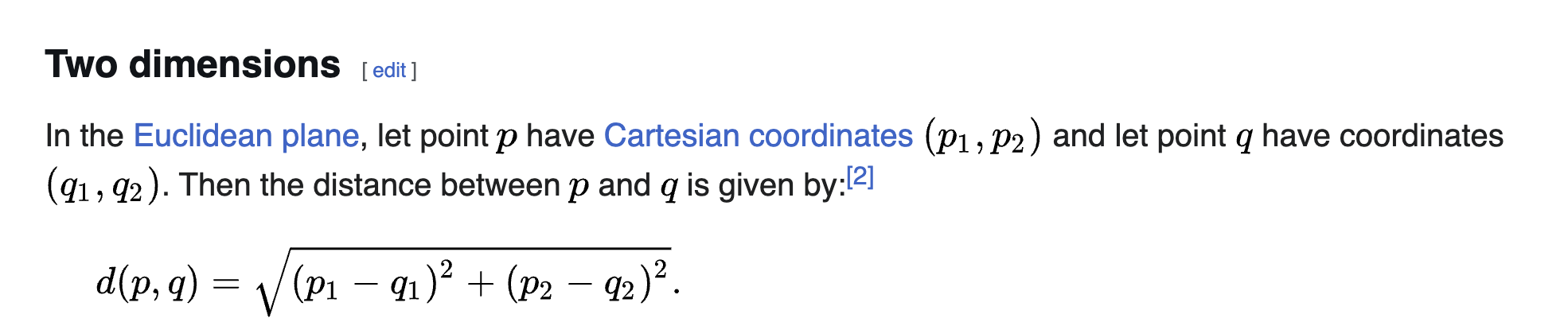
To get the distance traveled we need to sort the data by time starting from the beginning. Then we can get the Euclidean distance between two points in time.
In [30]:
def calculate_distance(frame):
frame_sorted = frame.sort_values(by='timestamp')
points = np.array(list(zip(frame_sorted['x'], frame_sorted['y'])))
distances = np.sqrt(np.sum(np.diff(points, axis=0) ** 2, axis=1)) / 1000
frame_sorted['distance'] = np.insert(distances, 0, 0)
return frame_sorted
In [31]:
dist_A = calculate_distance(df_A)
dist_B = calculate_distance(df_B)
In [32]:
print(f"User A total travelled distance: {dist_A['distance'].sum()}")
print(f"User B total travelled distance: {dist_B['distance'].sum()}")
User A total travelled distance: 62827.35076209153 User B total travelled distance: 156695.5143988626
7. What is the average monthly distance covered by User A and User B?
In [33]:
months = ['January', 'February', 'March', 'April', 'May', 'June', 'July', 'August', 'September', 'October', 'November', 'December']
years = list(set(df['year']))
In [34]:
print('User A avg distance traveled by month:')
print(pd.DataFrame({
'Month': months,
'Avg km in month': [np.sum(dist_A[dist_A['month'] == i]['distance']) / len(years) for i in [j for j in range(1, 13)]]
}))
User A avg distance traveled by month:
Month Avg km in month
0 January 567.253005
1 February 560.533186
2 March 689.904344
3 April 859.198013
4 May 911.389478
5 June 925.630021
6 July 919.111826
7 August 961.655337
8 September 814.825461
9 October 671.555915
10 November 594.584864
11 December 499.694375
In [35]:
print('User B avg distance traveled by month:')
print(pd.DataFrame({
'Month': months,
'Avg km in month': [np.sum(dist_B[dist_B['month'] == i]['distance']) / len(years) for i in [j for j in range(1, 13)]]
}))
User B avg distance traveled by month:
Month Avg km in month
0 January 1107.368467
1 February 1689.435450
2 March 2314.864673
3 April 1553.078948
4 May 2124.463820
5 June 1838.930840
6 July 2666.593389
7 August 1780.578993
8 September 1799.382978
9 October 1566.585483
10 November 2046.071745
11 December 1897.718700
8. Visualize the movement path on the map!
Methodology: Sort user entries by time starting from the beginning. Then connect points to lines: row 0 <-> row 1; row 1 <-> row 2 etc.
In [36]:
def get_movement_path(frame, user):
df_sorted = frame.sort_values('timestamp', ascending=True)
lines = LineString(df_sorted.point.tolist())
gdf_lines = gpd.GeoDataFrame({'geometry': [lines]}, crs="EPSG:4326")
fig, ax = plt.subplots(figsize=(30, 30))
municipalities.plot(ax=ax, linewidth=2, color="white", edgecolor="black")
gdf_lines.plot(ax=ax, linewidth=0.5, color="red")
ax.set_title(f"User {user} movement Path")
ax.spines['top'].set_visible(False)
ax.spines['bottom'].set_visible(False)
ax.spines['left'].set_visible(False)
ax.spines['right'].set_visible(False)
plt.show()
In [37]:
get_movement_path(df_A, 'A')

In [38]:
get_movement_path(df_B, 'B')

9. What are the monthly dynamics of mobility (Compare July and February!)?
In [39]:
dist_A_feb = dist_A[dist_A['month'] == 2]
dist_A_july = dist_A[dist_A['month'] == 7]
dist_B_feb = dist_B[dist_B['month'] == 2]
dist_B_july = dist_B[dist_B['month'] == 7]
In [40]:
dist_A_feb.groupby('year')['distance'].sum()
Out[40]:
year 2008 671.416904 2009 773.441623 2010 368.707987 2011 470.168377 2012 830.806455 2013 424.969824 2014 384.221131 Name: distance, dtype: float64
In [41]:
dist_A_july.groupby('year')['distance'].sum()
Out[41]:
year 2008 1197.249236 2009 997.400876 2010 786.746739 2011 989.375939 2012 1237.164656 2013 521.662105 2014 704.183229 Name: distance, dtype: float64
In [42]:
dist_B_feb.groupby('year')['distance'].sum()
Out[42]:
year 2008 1935.323810 2009 1825.417303 2010 1519.217377 2011 1822.836374 2012 1787.337961 2013 1334.120547 2014 1601.794778 Name: distance, dtype: float64
In [43]:
dist_B_july.groupby('year')['distance'].sum()
Out[43]:
year 2008 1650.543914 2009 2873.349771 2010 3497.352624 2011 2218.372680 2012 2517.840734 2013 2697.687257 2014 3211.006746 Name: distance, dtype: float64
In [44]:
def get_bar_chart(labels, user_a, user_b, title, x_title, y_max=None, fig_size=(8, 5), label_1='User A', label_2='User B'):
x = np.arange(len(labels))
width = 0.35
fig, ax = plt.subplots(figsize=fig_size)
ax.bar(x - width/2, user_a, width, label=label_1, color='green')
ax.bar(x + width/2, user_b, width, label=label_2, color='blue')
ax.set_ylabel('Distance (km)')
ax.set_xlabel(x_title)
ax.set_title(title)
ax.set_xticks(x)
ax.set_xticklabels(labels)
ax.legend(loc='upper left')
if y_max:
ax.set_ylim(0, y_max)
plt.tight_layout()
plt.show()
In [45]:
def get_line_chart(labels, user_a, user_b, title, y_max=None, label_1='Distance (km)', label_2='Number of calls'):
plt.figure(figsize=(10, 6))
plt.plot(labels, user_a, marker='o', linestyle='-', color='green', label=label_1)
plt.plot(labels, user_b, marker='s', linestyle='-', color='blue', label=label_2)
plt.title(title)
plt.xlabel('Month')
plt.ylabel('Count')
plt.grid(True)
plt.legend()
plt.tight_layout()
plt.show()
In [46]:
get_bar_chart(
[2008 + i for i in range(7)],
list(dist_A_feb.groupby('year')['distance'].sum()),
list(dist_B_feb.groupby('year')['distance'].sum()),
'Total distance covered in February',
'Year',
4000,
)

In [47]:
get_bar_chart(
[2008 + i for i in range(7)],
list(dist_A_july.groupby('year')['distance'].sum()),
list(dist_B_july.groupby('year')['distance'].sum()),
'Total distance covered in July',
'Year',
4000,
)

In [48]:
get_bar_chart(
['February', 'July'],
[dist_A_feb['distance'].sum(), dist_A_july['distance'].sum()],
[dist_B_feb['distance'].sum(), dist_B_july['distance'].sum()],
'Total distance covered in February and July',
'Month'
)

10. Is there a correlation between calling activity and mileage? (What does it mean? How to interprete it?)
In [49]:
dist_A_y = {}
dist_B_y = {}
call_A_y = {}
call_B_y = {}
for i in range(7):
year_value = 2008 + i
dist_A_y[year_value] = list(dist_A[dist_A['year'] == year_value].groupby('month')['distance'].sum())
dist_B_y[year_value] = list(dist_B[dist_B['year'] == year_value].groupby('month')['distance'].sum())
call_A_y[year_value] = list(dist_A[dist_A['year'] == year_value].groupby('month')['timestamp'].count())
call_B_y[year_value] = list(dist_B[dist_B['year'] == year_value].groupby('month')['timestamp'].count())
In [50]:
for i in range(7):
year_value = 2008 + i
get_line_chart(
months,
dist_A_y[year_value],
call_A_y[year_value],
f"User A distance and number of calls correlation for {year_value}",
)


In [51]:
for i in range(7):
year_value = 2008 + i
get_line_chart(
months,
dist_B_y[year_value],
call_B_y[year_value],
f"User B distance and number of calls correlation for {year_value}",
)


